Text formatting is an essential aspect of programming, as it helps improve the readability and organization of code. In C#, there are various ways to format text, including inserting new lines and line breaks. Proper text formatting makes the code easier to understand and enhances collaboration among developers.
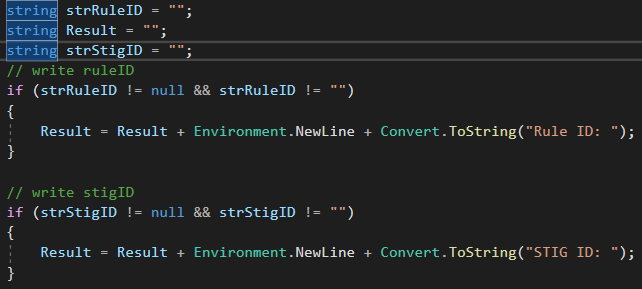
Importance of New Lines in Text Formatting
New lines play a crucial role in text formatting as they help break up long lines of code into smaller, more manageable chunks. By inserting new lines at appropriate places, you can improve the readability and organization of your code. This is especially important when working on large projects or collaborating with other developers.
For example, consider the following code snippet without any new lines:
“`
public void CalculateSum(int a, int b) { int sum = a + b; Console.WriteLine(“The sum is: ” + sum); }
“`
Now, let’s add some new lines to make the code more readable:
“`
public void CalculateSum(int a, int b)
{
int sum = a + b;
Console.WriteLine(“The sum is: ” + sum);
}
“`
By adding new lines, we have separated the different parts of the code, making it easier to understand and navigate. This simple formatting technique can greatly enhance the readability of your code.
Understanding the Concept of Line Breaks in C#
In programming, line breaks refer to the termination of a line of code. They are used to indicate the end of a statement or instruction. Line breaks are different from new lines in that they do not necessarily create a visual separation between lines of code.
For example, consider the following code snippet:
“`
int a = 5; int b = 10;
“`
In this case, there are no line breaks between the two statements. However, each word is still executed separately.
The Different Ways to Insert New Lines in C#
In C#, several methods exist for inserting new lines in your code. Let’s take a look at some of the most commonly used methods:
1. Using the escape sequence “\n”:
“`
Console.WriteLine(“Hello\nWorld”);
“`
Output:
“`
Hello
World
“`
2. Using the Environment.NewLine property:
“`
Console.WriteLine(“Hello” + Environment.NewLine + “World”);
“`
Output:
“`
Hello
World
“`
3. Using the StringBuilder class:
“`
StringBuilder sb = new StringBuilder();
sb.AppendLine(“Hello”);
sb.AppendLine(“World”);
Console.WriteLine(sb.ToString());
“`
Output:
“`
Hello
World
“`
Using the Environment.NewLine Method in C#
The Environment. The NewLine method is convenient for inserting new lines in your code. It returns the appropriate newline string for the current platform, whether it’s “\n” for Unix-based systems or “\r\n” for Windows.
Here’s an example of how to use the Environment.NewLine method:
“`
string message = “Hello” + Environment.NewLine + “World”;
Console.WriteLine(message);
“`
Output:
“`
Hello
World
“`
By using the Environment. With the newLine method, you can ensure that your code is platform-independent and will work correctly on any system.
How to Insert New Lines in Console Applications
In console applications, you can easily insert new lines using the Console.WriteLine() method. This method automatically adds a new line after each call.
Here’s an example:
“`
Console.WriteLine(“Hello”);
Console.WriteLine(“World”);
“`
Output:
“`
Hello
World
“`
You can also use the escape sequence “\n” to insert a new line:
“`
Console.WriteLine(“Hello\nWorld”);
“`
Output:
“`
Hello
World
“`
Formatting Text in Windows Forms Applications
In Windows Forms applications, you can format text using various controls and properties. For example, you can use the TextBox control to display multiline text and set the Multiline property to true.
Here’s an example:
“`
TextBox textBox = new TextBox();
textBox.Multiline = true;
textBox.Text = “Hello” + Environment.NewLine + “World”;
“`
Output:
“`
Hello
World
“`
You can also use the RichTextBox control, which provides more advanced text formatting options, such as different fonts, colors, and styles.
Using New Lines in String Concatenation with C#
In C#, you can use new lines in string concatenation to create multiline strings. This can be useful when creating formatted output or displaying a block of text.
Here’s an example:
“`
string message = “Hello” + Environment.NewLine + “World”;
Console.WriteLine(message);
“`
Output:
“`
Hello
World
“`
You can also use the StringBuilder class to concatenate strings with new lines:
“`
StringBuilder sb = new StringBuilder();
sb.AppendLine(“Hello”);
sb.AppendLine(“World”);
Console.WriteLine(sb.ToString());
“`
Output:
“`
Hello
World
“`
Best Practices for Using New Lines in C#
When using new lines in your code, it’s important to follow some best practices to ensure readability and maintainability:
1. Use new lines to separate logical blocks of code: By inserting new lines between different sections of your code, you can make it easier to understand the flow and structure of your program.
2. Use consistent indentation: Indentation helps visually separate different code levels and makes it easier to follow the logic. Make sure to use a consistent indentation style throughout your codebase.
3. Avoid excessive use of new lines: While new lines are important for readability, excessive use can make your code look cluttered and harder to read. Use new lines judiciously to enhance readability without sacrificing clarity.
4. Consider the platform: When inserting new lines, be mindful of the forum on which your code will be executed. Use the Environment.NewLine method to ensure cross-platform compatibility.
Mastering Text Formatting with C#
In conclusion, text formatting is a crucial aspect of programming, and mastering it can greatly improve the readability and organization of your code. Using new lines and line breaks effectively makes your code easier to understand and collaborate on.
This article explored the importance of new lines in text formatting and discussed various methods for inserting new lines in C#. We also looked at how to format text in console and Windows Forms applications and how to use new lines in string concatenation.
Following best practices and being mindful of readability, you can become proficient in text formatting with C# and write clean, well-organized code. So keep learning and practicing, and soon you’ll be a master of text formatting in C#.